
Virtual Care Platform (PSV) Patient Access Portal


Need help?
Help is available to Patient Access Portal users.
First, check the Frequently Asked Questions (FAQ) to find the answer you’re looking for. If you’d like to speak with someone for assistance, you’ll find the contact information at the bottom of this page.
Frequently asked questions (FAQ)
No. The service is offered free of charge by Santé Québec.
All professionals you interact with through the portal are employees of Québec’s health and social services network.
Multi-factor authentication allows you to verify your identity using a verification code in addition to your email address and password.
Your clinical information is accessible only by your healthcare provider and their team. However, for administrative reasons, certain information, such as your name, email address, and home address, are visible to support staff.
Your invitation code allows you to create your account. You will only be asked to enter it once, when you create your account.
The verification code is used each time you log into the portal to help safeguard your personal information.
The Patient Access Portal works with both computers and mobile devices, like tablets and smartphones (iOS and Android). It is compatible with Edge, Chrome, Safari, and Firefox browsers.
Log out of the portal, then log back in. If you continue to see an error message, contact the support centre by phone at 1 833 564-0404 (toll free in Quebec).
The support centre is open from 7 a.m. to 6 p.m., Monday to Friday.
Your healthcare provider will send you an email containing an invitation link. Click on this link and enter the requested information to create your account. You will need the invitation code that your healthcare provider will have provided you ahead of time. This code is valid for 5 days.
To learn more, visit the Create an account.
To learn more, visit the Create an account.
Your invitation code is valid for 5 days. After this time, you will need a new code. Contact the clinic or the healthcare provider who provided you your original code.
To learn more, visit the Create an account.
The portal is accessible both official languages, French and English. To change the language, click the “English” or “Français” button at the top of the screen.
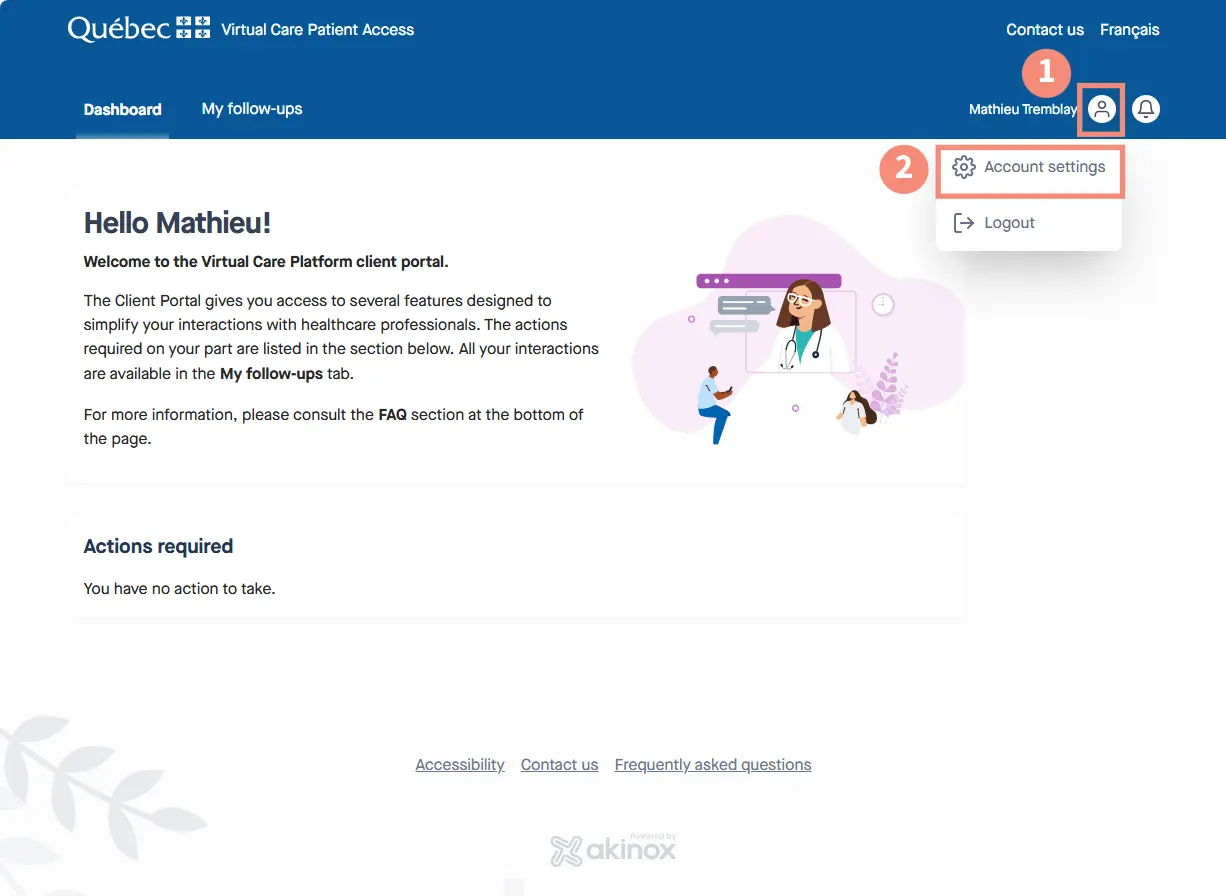
See how to access settings using a computer
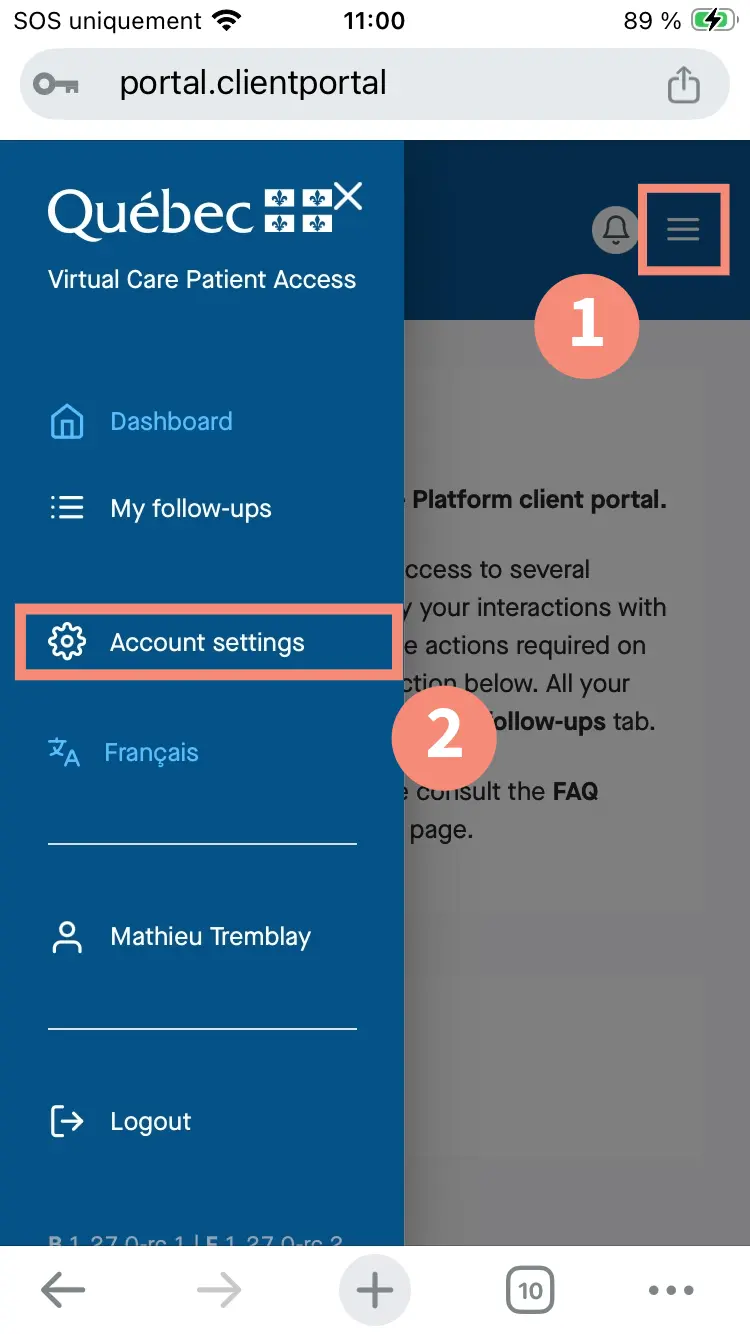
See how to access settings with a mobile device
- Log into your account;
- Go to your account settings;
- Click on the pencil symbol to modify your information.
See how to access settings using a computer
See how to access settings with a mobile device
You can designate someone to help you with virtual care. This also applies to parents or guardians of children under 14 years old, as well as legal representatives.
This person can:
- access questionnaires and messages sent by your healthcare professional;
- participate in communication with your care team;
- provide medical information about you;
- accompany you to virtual appointments (through a link provided to them by email).
User support
You have two support options available:
Contact your healthcare provider or clinic
If your request concerns your follow-up as a patient, you should contact your healthcare provider. For example, if:
- you need your healthcare provider to send you a new invitation code (because yours is lost or expired);
- you need help understanding a question in a questionnaire;
- you want to reschedule or cancel a virtual appointment.
Contact technical support
If you have a technical question, you should contact the Centre de soutien des services numériques en santé (CSSNS). For example, if:
- you want to reset your password;
- you need help creating your account;
- you need help navigating the portal;
- your login link is not working;
- you are having trouble uploading a document to the portal.
Get technical support from the CSSNS
- From Monday to Friday
- 7 a.m. to 6 p.m.
- 1 833 564-0404 (toll free in Quebec)
- Book a telephone appointment with a technician
Last update: August 13, 2026